
Free Online PCAP Viewer
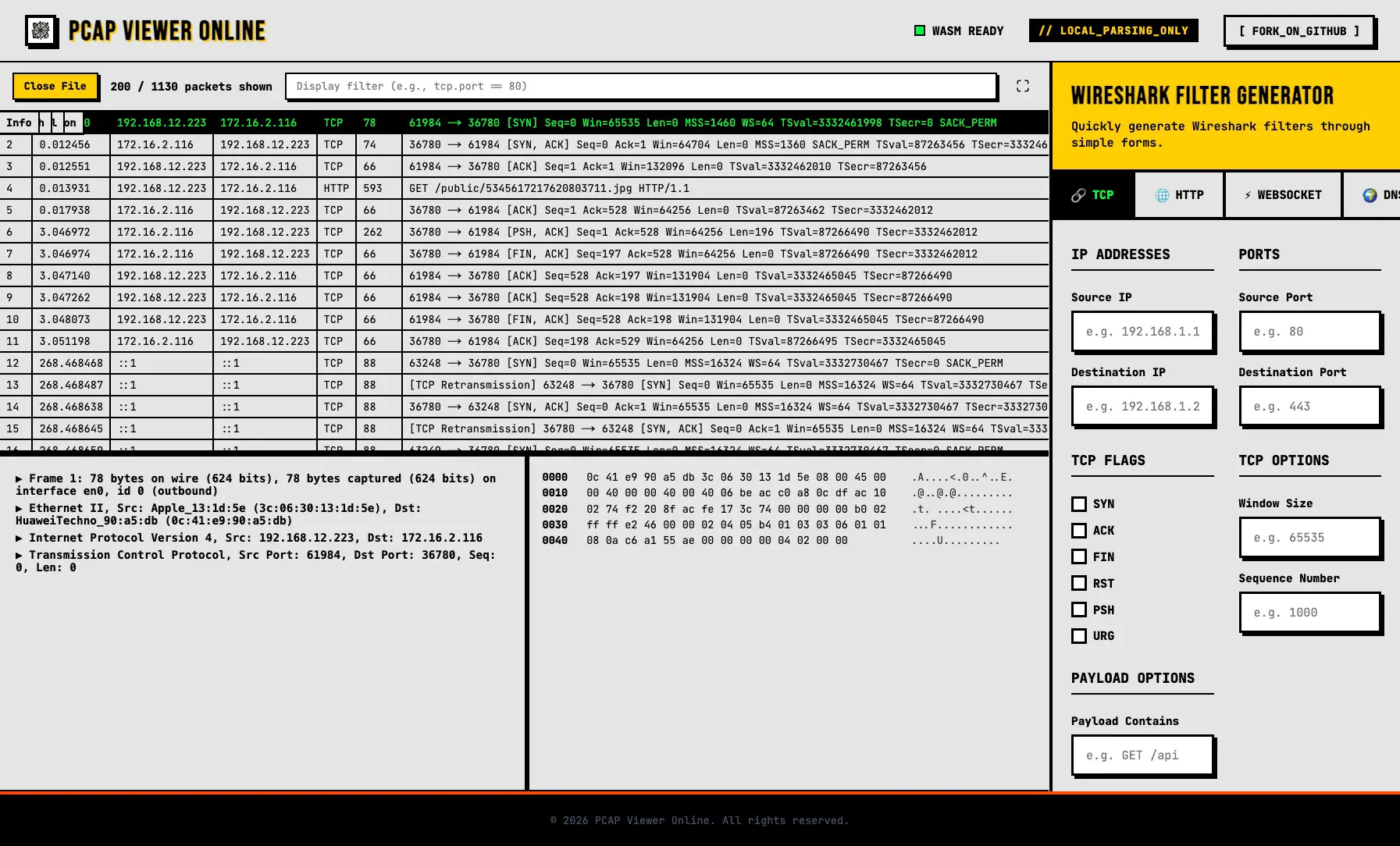
Instantly open, parse, and analyze your packet capture files (.pcap, .pcapng) directly in your browser. Everything runs 100% locally—your files are never uploaded to any server. The core parsing engine is powered by WebAssembly compiled directly from Wireshark's C/C++ source code, providing identical protocol decoding capabilities without installing the desktop app.
Loading Parser Engine (68MB WASM)... Please wait.
Why use PCAP Viewer Online?
Experience desktop-grade network protocol analysis directly in your web browser with zero compromises.
100% Privacy
Everything runs entirely in your local browser using WebAssembly. Your sensitive PCAP files never leave your machine. No uploads, no cloud servers, no data retention.
Wireshark Engine
Powered by the exact same C/C++ engine that runs the desktop Wireshark app, compiled directly to WebAssembly. Expect the exact same packet decoding, protocol support, and reliability.
No Installation
Skip the bulky downloads and admin privileges. Open packet captures instantly on any device, from any modern web browser, regardless of your operating system.
Advanced Filtering
Utilize the built-in Smart Filter Generator to build complex display filters for TCP, HTTP, WebSocket, and DNS without having to memorize Wireshark syntax.
100% Open Source
Fully open-source and transparent. You can inspect the source code, verify our security claims, or self-host it if you prefer complete control over your network analysis environment.
How it Works
- Step 1: Select your .pcap or .pcapng file.
- Step 2: The built-in WASM engine parses packets locally.
- Step 3: View, filter, and analyze packets instantly.
Use Cases
- Need a quick way to view and analyze PCAP files without downloading or installing Wireshark.
- Don't want to upload sensitive PCAP files to third-party servers, which is required by other online viewers.
- Currently learning network protocols and need a handy tool for packet analysis.
Frequently Asked Questions
What is a PCAP file?
PCAP (Packet Capture) is a file format used to capture network traffic. It contains various packets transmitted over a network. These files are typically generated by packet sniffing tools like Wireshark or tcpdump and are widely used for network troubleshooting, security analysis, or learning network protocols.
Is it safe to view PCAP files online?
Yes, it is absolutely safe on our website. Unlike other online tools that require you to upload your files to a server, our tool relies entirely on WebAssembly (WASM) to parse PCAP files locally in your browser. Your sensitive data never leaves your device or gets uploaded to any external servers.
Why does the website download data when first opened?
This happens because the site needs to load our core WASM parsing engine. This engine is compiled directly from Wireshark's core C/C++ source code using wiregasm, ensuring identical parsing capabilities to the desktop version. The file size is approximately 68MB, and loading time depends on your internet connection speed. If it fails to load, please check your network connection and refresh the page.
What is the purpose of the Wireshark Filter Generator?
The Wireshark Filter Generator provides an intuitive form that automatically generates complex filter expressions, making it easier to master Wireshark syntax or reverse-engineer expressions without memorizing them. You can hide the Filter Generator anytime by clicking the fullscreen button.